A month ago I swapped my home network’s core for a UniFi Dream Router 7. As someone who spends most of the day thinking about infrastructure — cloud or otherwise — I wanted a home setup that felt less like a consumer gadget and more like something I could actually monitor, tune and trust. Here’s what a month of daily use looked like.
Why I made the switch
My previous setup was an Apple AirPort Extreme — reliable in its day, but with no real visibility into what was happening on the network, no VLANs, no meaningful traffic insights, and a hard ceiling on throughput. The Dream Router 7 promised the full UniFi OS experience (the same console that runs UniFi’s business-grade gear) in a single consumer-friendly box, plus Wi-Fi 7.
Setup
Installation is genuinely simple. The UniFi app handles the initial setup and simplifies the basic parametrization a lot — I had my SSIDs migrated and a working network in minutes. What I like is that it doesn’t stop there: since the Dream Router 7 is also a cloud gateway, all the more advanced configuration — VLANs, firewall rules, traffic identification — is available straight from the UniFi cloud portal, without needing to be on the local network to manage it.
Real-world speed
With the AirPort Extreme, I never saw more than 500 Mbps, no matter what my ISP plan advertised. Here’s what I measured over Wi-Fi with the Dream Router 7 after the initial setup settled in:
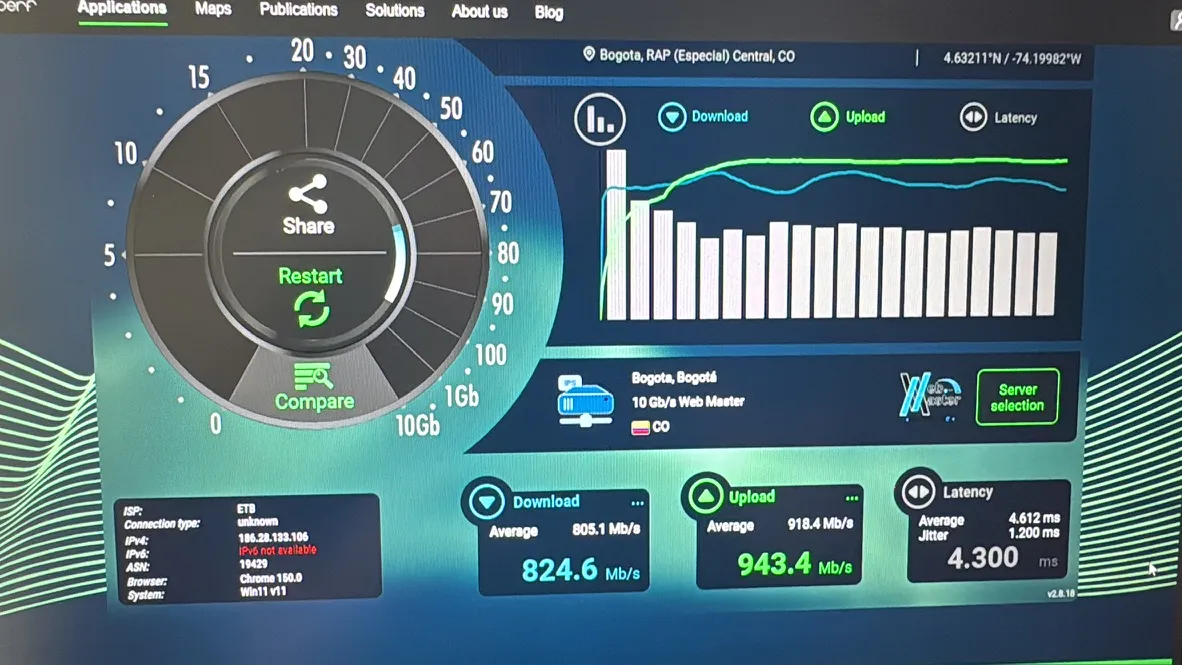
On a Windows laptop connected wirelessly, average results landed at 805.1 Mb/s down and 918.4 Mb/s up (peaking at 824.6 Mb/s and 943.4 Mb/s respectively), with 4.6 ms average latency and 1.2 ms jitter — tested against ETB’s network from Bogotá.
I ran the same test from an iPhone 15 Pro to cross-check across devices, and Speedtest scored it a “Puntuación máxima” (max score) with 810 Mbps down and 905 Mbps up:
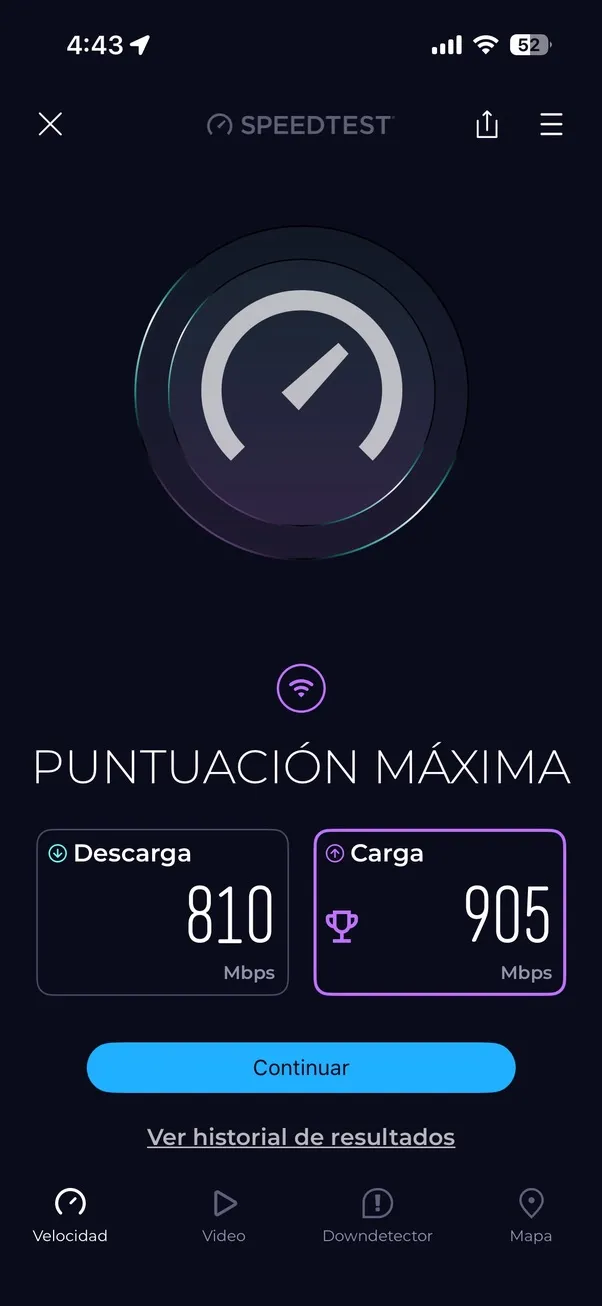
What stood out to me wasn’t a single big number — it’s that two very different devices, on two different operating systems, landed within a few percentage points of each other, comfortably north of 800 Mb/s in both directions. For the first time I feel like I’m actually getting the speed I pay my ISP for, with enough headroom left over to grow into a 2.5 Gbps or even 10 Gbps plan down the road without the router being the bottleneck.
The UniFi app and ecosystem
The single biggest upgrade isn’t raw speed — it’s visibility. The UniFi app ships with a genuinely wide set of diagnostic and monitoring tools, and they’re intuitive enough that I can run real tests and track down issues without pulling out a separate device or tool. Being able to see per-client bandwidth usage, set up alerts, and manage everything from one app instead of juggling separate tools for router, access point and switch makes a real difference for anyone used to observability in their day job.
Living with it day to day
Beyond the benchmark numbers, day-to-day browsing feels noticeably more fluid, and every device on the network connects more reliably than it used to. Part of that comes down to Wi-Fi 7 itself still being rare — most ISPs hand out routers that only cover the 2.4 and 5 GHz bands, so running on a band almost nothing else around me uses means minimal interference and lower latency across the board.
What I’d improve
There are a few things worth knowing before buying. Some features that feel like they should be included, like Cloudflare’s DNS-based protection, are actually a paid add-on — routers like Aruba’s offer layer 7 protection at no extra cost. The unit itself is also designed to sit on a desk or shelf; if you want to wall-mount it, you’ll need a separate accessory that’s either sold on its own or 3D-printed. And the included PoE port is PoE only, not PoE+ — I had planned to pair it with a UniFi AP 7 Pro, which needs PoE+, so I ended up having to buy a separate power injector.
Final verdict
I’d genuinely recommend this router to anyone who wants a powerful, easy-to-use setup for their home, as long as the budget fits — it’s not cheap. It can even be a disruptive choice for a small business with a modest area to cover, though it’s worth remembering that your overall performance is only as good as your weakest link: interfaces, adapters, cables, switches and everything else in the chain matter just as much as the router itself. What impressed me most is how much this device closes the performance gap between wired and wireless — a month in, I’m not missing the cable.